

LoggerFlex NFC App
Scan your NFC loggers directly to the cloud. Download the official app for your device.


Got a free sample tag?
Start it in 2 minutes. Then ship it with a real load.
Four steps, then one tap by the receiver puts the whole trip in your account. No USB, no PC, no subscription, ever.
Create your free account
Sign up for LF Cloud. Your tags report there, with PDF and Excel reports.
Create a free accountGet the free app
Install LoggerFlex NFC on your iPhone or Android phone and enter your account email. There is no login or password in the app.
App StoreGoogle PlayStart the tag
Press the button 3 times within 2 seconds. A red flash confirms it. The first reading comes 10 minutes later.
Tap, ship, get the trip
Tap it with the top of your phone, peel it off the flyer and ship it with a real load. The receiver taps it on arrival with the free app, and the whole trip lands in your account.
Your sample is preset to 2 to 8 °C (36 to 46 °F) and starts warm, so the first tap sends an alarm email: that is the alarm working. Shipping on ice? Change the range on the tag’s settings page in LF Cloud.
Used your sample?
Ask for your first 10 tags, preset to your range at no extra cost.
Tell us your lane and how many shipments. An engineer replies within one business day. EDGE loggers watch the cold rooms, freezers, fridges and reefers that stay with you, in the same account.
Optional. It tells us which mailing you came from.
Filed reports, not CSVs.
Refrigerated transport summaries, vaccine reports with MKT and NSF/ANSI 456 logs, or HACCP food safety records.
Waterproof.
Wet ice, gel packs, humid containers — where a USB stick can't go.
Hosted in Canada.
Your readings stream to and reside in a Canadian cloud — Canadian data residency.
1. Hardware Activation
- Action: Press the power button 3 times within 2 seconds.
- Confirmation: A red flash lasting 3 seconds confirms the tag is activated.
- Delay: As standard, the tag waits 10 minutes before taking the first reading. This gives you time to place it in the final location, like refrigerated transportation. A different start delay (none, minutes, hours or days) can be configured to order.
- Specs: As standard, the tag records every 10 minutes and holds 4,000 readings, about 4 weeks of data, then stops when the memory is full. The interval (1 minute to 24 hours), alarm limits, continuous mode (overwrites the oldest reading) and a red alarm LED can be configured to order at no extra cost. The CR2032 battery lasts about 1 year after activation, and about five years on the shelf.
2. First time App Setup
- Settings: Select your preferred language and choose a Dark Theme or Light Theme.
- Cloud Link: Enter a valid email address that is already registered on our free cloud account.
- Simplicity: There is no login or password required on the mobile app. The email simply routes your scanned data direct to cloud. The person scanning does not need to be the account owner.
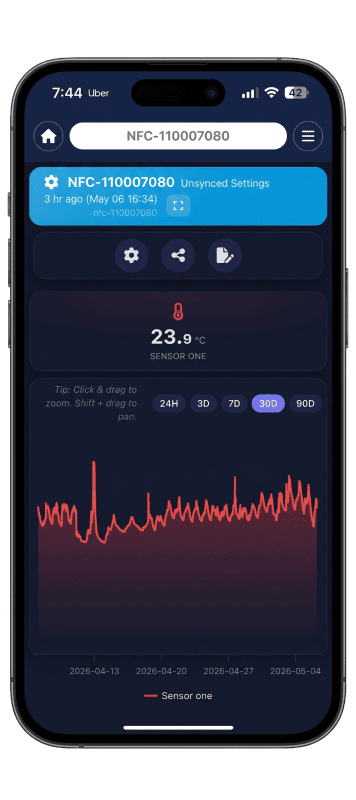
3. Scanning Process
Preparation: Place the tag landscape on a flat surface like a table.
iPhone Flow
Place the top edge of the iPhone over the tag with a few centimeters of overlap. Press the "Start Scanning" button.
Android Flow
The app automatically enters Scan Mode. Place the top half of the phone over the tag. It is best to place the tag 2 cm or 1 inch lower than the top of the phone.
Reading Rules
Do not move the phone or tag. A progress bar will show the percentage of logs extracted. If disrupted, you must repeat the process.
iPhone Placement
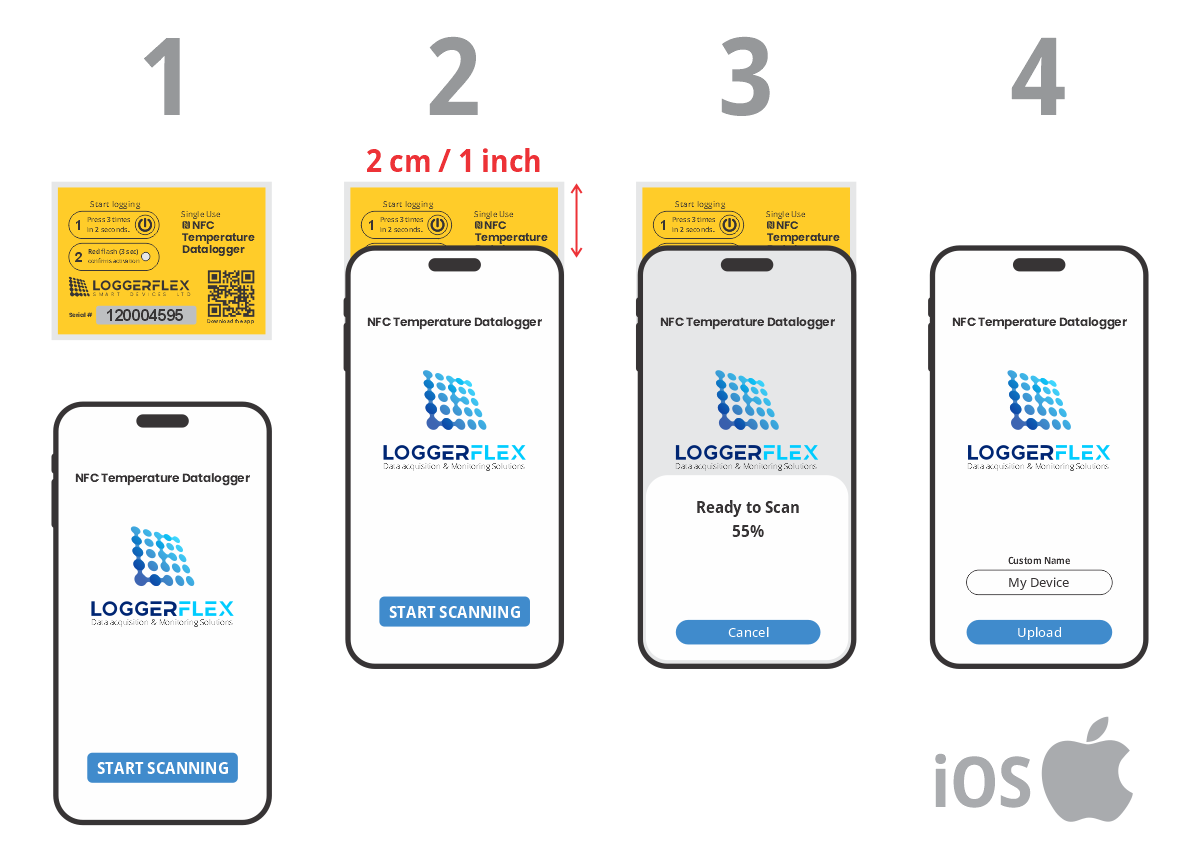
4. Cloud Reporting
- Sync: Once reading reaches 100%, assign an optional name to the sensor. Press "Upload" to send data to the cloud. Make sure your phone is connected to the internet.
- Reports: To view data, the account owner logs into app.loggerflex.com. Click the specific sensor card, go to Advanced Reports, and extract PDF or Excel reports for transportation, vaccine safety, or daily averages for any time interval.
Frequently asked questions
NFC single-use cold-chain loggers
What is the Microthermo NFC logger, and when should I use one?
Microthermo (part nfcmic) is a single-use NFC temperature logger you drop into a parcel, cooler or pallet before it ships. It runs on its own with no gateway, no Wi-Fi and no SIM. At the destination someone with the free LoggerFlex NFC app taps a phone to the tag and the full trip history uploads to LF Cloud, where the shipment report is built. Use it when you need per-shipment proof of cold-chain condition on parcels you do not get back, rather than continuous live monitoring of a fixed room.
How do I start a tag before it ships?
Press the tag's power button three times within two seconds. A red flash lasting three seconds confirms it is running. The tag then waits 10 minutes before its first reading, which gives you time to pack it and get it into the refrigerated space before logging starts. After that it records on its own with no further handling. There is no pairing, no hotspot, no serial number to register and no Wi-Fi step anywhere in this flow — activation is the button press and nothing else.
How long does one tag log, and what happens when it fills up?
As standard, the tag records every 10 minutes and holds 4,000 readings, about four weeks, then stops recording when the memory is full, so the start of the trip is kept. The interval can be configured to order anywhere from 1 minute to 24 hours, which shortens or stretches that window. Continuous mode can be ordered instead: the tag keeps recording and overwrites the oldest reading, so scan it at least once per memory cycle and LF Cloud keeps every reading. The CR2032 battery lasts about 1 year after activation, and five years on the shelf before activation. For alarms while a load is still moving, use a reusable EDGE cellular logger that syncs as it travels.
What app reads the tags, and does the person scanning need an account?
The free official LoggerFlex NFC app, on the Apple App Store for iOS and Google Play for Android. On first launch you choose a language and theme, then enter an email address that is already registered on a free LoggerFlex cloud account. There is no login or password in the app itself. The email only routes scanned data to that account, so the person scanning — a driver, a receiver, a warehouse clerk — does not have to be the account owner or hold any LoggerFlex credentials of their own.
How do I scan a tag? My phone keeps losing the read.
Lay the tag landscape on a flat surface first. On iPhone, overlap the phone's top edge over the tag by a few centimetres (about an inch) and press Start Scanning. On Android the app enters scan mode by itself; hold the top half of the phone over the tag, with the tag about 2 cm (0.8 in) below the top of the phone. Do not move the phone or the tag while the progress bar runs. If the read is interrupted you have to start it again from the beginning.
Where does the data go, and how do I get a report out of it?
Once the read reaches 100% you can name the sensor and press Upload; make sure the phone is connected to the internet at that point. The data goes directly to our servers in Canada (Montreal). The account owner then signs in at app.loggerflex.com, opens that sensor card and goes to Advanced Reports to extract PDF or Excel reports for transportation, vaccine safety or daily averages over any interval. A free LoggerFlex cloud account is all that is needed to receive the scan.
Can the person who scans the tag also read the temperature data?
Only if you let them. Role-based access in LF Cloud lets the person who taps to extract the data be blocked from reading it, so a courier or receiving clerk can pull a trip off a tag without opening the record. Device sharing uses five roles — Owner, Editor, Viewer, Silent Viewer and Service and Maintenance — granted per device by email invitation. For NFC tags, sharing with as many people as you like is free, with no subscription. Only the cloud users you authorize see the temperature history and the reports built from it.
Will a tag survive wet ice, gel packs and humid containers?
Yes. The tag is waterproof, so it can travel in wet ice, sit against gel packs or ride inside a humid container where a USB stick cannot go. It is flat and light, about 9 g (0.3 oz) at 72 x 49 x 5 mm (2.8 x 1.9 x 0.2 in), so it lies against the product instead of taking up payload space. The measuring range is -20 °C to +70 °C (-4 °F to +158 °F), with an accuracy of ±0.5 °C (±0.9 °F); the tag does not come with a NIST certificate. For the remaining environmental limits, use the Microthermo datasheet on the datasheets page or ask your distributor for the current sheet.
Should I use single-use NFC tags or a reusable cellular logger for shipments?
Use Microthermo when the proof only has to exist at the end of the trip; it is built to stay with a parcel you never get back. Use a reusable cellular logger when you need alarms while the load is still moving: EDGE Thermo Cellular covers -55 °C to +125 °C (-67 °F to +257 °F) on a built-in eSIM that works in over 170 countries. EDGE GEO adds battery-efficient, non-real-time geo-location from cell towers and WiFi networks to that temperature record and uploads trip reports for the route. Many customers run both: tags on outbound parcels, cellular loggers on their own vehicles.
How do I order more tags, and how long do they keep in the stockroom?
Microthermo is supplied through your authorized LoggerFlex distributor, who quotes quantities, lead time and local stock for your region. LoggerFlex does not publish list prices on loggerflex.com, so start on the distributors page to find your partner, or use the contact form to be routed to one and to talk to an engineer about volumes. Unused tags keep for about five years on the shelf, and the battery lasts about one year once a tag is activated, so order against the shipping volume you expect rather than stockpiling far ahead.