Microthermo — Single-use NFC temperature data logger
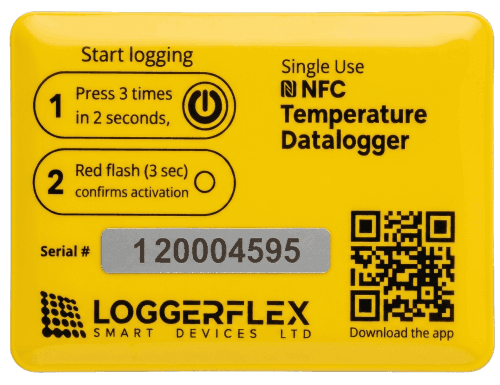
LoggerFlex Microthermo is a waterproof single-use NFC temperature data logger for shipments of food, seafood, produce and pharmaceuticals. Press the button 3 times to start it and drop it in the box. On arrival, the receiver taps it with an iPhone or Android phone and the whole trip uploads to your LF Cloud account in about five seconds, with no gateway, cable or login. Everyone you share the account with sees the chart, the scan location and PDF or Excel reports, and gets an email and push alert at the scan if any reading was outside your alarm limits. The start delay, recording interval (1 minute to 24 hours), alarm limits, stop-when-full or continuous mode and a red alarm LED are configured to order at no extra cost, and there is no subscription for NFC tags.
What Microthermo does
A single-use NFC temperature logger travels inside a parcel, cooler or pallet and records the temperature along the way. Press the button on a LoggerFlex Microthermo 3 times and drop it in the box. On arrival, a tap with an iPhone or Android phone uploads the whole trip to your LF Cloud account. If anything was out of range, your team gets an email and push alert at the scan.
- A phone, not a PC: Read it with an iPhone or Android phone and the free LoggerFlex NFC app. No dock computer, USB cable or Windows software.
- The trip goes to your account: The receiver's app is set once to your LF Cloud account email. Every tap uploads the whole trip there, not to a file on their phone, and the person scanning needs no login.
- Alerts at the scan: If any reading was outside your alarm limits, everyone you share with gets an email and push alert when the tag is scanned. No alert means every reading was in range.
- Waterproof, can be submerged: Ice slush, wet seafood totes, melting gel packs or a water bath. It reads by tap, so there is no port to seal.
- 3 presses to start: Press the button 3 times and a red flash confirms it. No phone, PC or tool is needed at the shipping end.
- No subscription, ever: The app, the cloud account, unlimited sharing, alerts, the full history and all reports are free for NFC tags.
Options configured to order
Tell LoggerFlex or your distributor how you ship when you place the order, and the tags arrive programmed for it. Nothing to install or configure at your end, and no extra charge.
- Start delay: Time to pack before recording starts: none, minutes, hours or days. Standard is 10 minutes after activation.
- Recording interval: Any interval from 1 minute to 24 hours. A longer interval stretches the 4,000-reading memory over a longer trip.
- Alarm limits: Low, high or both, for example 2 °C to 8 °C (36 °F to 46 °F) for vaccines. Any reading outside them triggers email and push alerts at the scan.
- When memory is full: Stop recording (standard, right for one-way shipments) or continuous mode: it keeps recording and overwrites the oldest reading.
- Red alarm LED: The tag flashes red after an out-of-range reading, so the receiver sees a problem as they open the box, before scanning. Needs at least one alarm limit.
- Standard setup: If you ask for nothing special: recording starts 10 minutes after activation, a reading every 10 minutes for about 4 weeks, then it stops. No alarm limits.
Your data in LF Cloud
Open LF Cloud at app.loggerflex.com on a Mac, PC or phone. Each tag has its own page: the full temperature chart, the minimum, average and maximum, and where it was scanned. With location turned on, the app sends the phone's position with each upload and the web app pins it on a map. It shows where and when the tag was read, not the route it took. Run any report when an auditor or customer asks, or set most of them to run automatically. All free.
- Daily minimum, maximum and average
- Vaccine temperature, with MKT
- Food safety
- Hourly
- Transport log
- Detailed readouts
- Peak points
- Custom interval
- Multi-sensor consolidation
- AI Deep Dive
- Several tags, one report: temperature mapping: Place tags at different spots in a truck, cooler, warehouse or room, then scan them. The multi-sensor report puts them side by side in one PDF or Excel report, a practical way to find warm and cold spots.
Full specifications
- Type: Single-use NFC temperature data logger (part NFCMIC)
- Measuring range: -20 °C to +70 °C (-4 °F to +158 °F)
- Accuracy: ±0.5 °C (±0.9 °F)
- Recording interval: 10 minutes as standard; any interval from 1 minute to 24 hours, set to order
- Memory: 4,000 readings, about 4 weeks at the standard 10-minute interval
- When memory is full: Stops recording (standard), or continuous mode: keeps recording and overwrites the oldest reading
- Activation: Press the button 3 times within 2 seconds; a red flash confirms it
- Start delay: 10 minutes after activation as standard; none, minutes, hours or days, set to order
- Alarm limits: Optional low and high limits, set to order; email and push alerts at the scan
- Alarm LED: Optional: flashes red after an out-of-range reading
- Battery: About 1 year after activation
- Shelf life: Five years, unused
- Readout: NFC tap with the free LoggerFlex NFC app for iPhone (recent iOS version) and Android; the full history uploads in about 5 seconds
- App sign-in: None to scan: the app is set once to the email of your LF Cloud account
- In-transit connectivity: None: no gateway, WiFi or SIM, and no alerts during the trip
- Water: Waterproof, can be submerged
- Weight and size: About 9 g; 72 × 49 × 5 mm
- Cloud and reports: LF Cloud at app.loggerflex.com: chart, minimum, average and maximum, scan location, 10 PDF and Excel report types
- Access: Role-based, shared with unlimited people; the person who scans can be kept from viewing the data
- Subscription: None for NFC tags
Frequently asked questions
How do I start an NFC Microthermo tag?
Press the tag's power button three times within two seconds; a red flash lasting three seconds confirms it is armed. The tag then waits 10 minutes before its first reading, which is your window to get it into the shipment or the cold room. It records every 10 minutes and holds 4,000 records, roughly four weeks; by default it stops recording when the memory is full (overwriting the oldest records is a factory option). The CR2032 battery lasts about one year once activated, and five years on the shelf. To read it, install the free LoggerFlex NFC app and enter an email already registered on a free LF Cloud account; the app itself has no login.
Do the water meter and the NFC tags use AA batteries like the loggers?
No, neither takes AA cells. The Cellular Water Meter carries a 3.6 V lithium battery rated for more than six years, sealed inside the meter. It can be replaced, but that means breaking the factory seal, so contact support first when the meter shows its E1 low-battery code. The Microthermo NFC tag runs on a CR2032 cell for about one year once activated, and keeps for five years on the shelf before activation. It is a single-use tag, so there is nothing to charge or replace.
What is the Microthermo NFC logger, and when should I use one?
Microthermo (part nfcmic) is a single-use NFC temperature logger you drop into a parcel, cooler or pallet before it ships. It runs on its own with no gateway, no Wi-Fi and no SIM. At the destination someone with the free LoggerFlex NFC app taps a phone to the tag and the full trip history uploads to LF Cloud, where the shipment report is built. Use it when you need per-shipment proof of cold-chain condition on parcels you do not get back, rather than continuous live monitoring of a fixed room.
How do I start a tag before it ships?
Press the tag's power button three times within two seconds. A red flash lasting three seconds confirms it is running. The tag then waits 10 minutes before its first reading, which gives you time to pack it and get it into the refrigerated space before logging starts. After that it records on its own with no further handling. There is no pairing, no hotspot, no serial number to register and no Wi-Fi step anywhere in this flow — activation is the button press and nothing else.
How long does one tag log, and what happens when it fills up?
As standard, the tag records every 10 minutes and holds 4,000 readings, about four weeks, then stops recording when the memory is full, so the start of the trip is kept. The interval can be configured to order anywhere from 1 minute to 24 hours, which shortens or stretches that window. Continuous mode can be ordered instead: the tag keeps recording and overwrites the oldest reading, so scan it at least once per memory cycle and LF Cloud keeps every reading. The CR2032 battery lasts about 1 year after activation, and five years on the shelf before activation. For alarms while a load is still moving, use a reusable EDGE cellular logger that syncs as it travels.
What app reads the tags, and does the person scanning need an account?
The free official LoggerFlex NFC app, on the Apple App Store for iOS and Google Play for Android. On first launch you choose a language and theme, then enter an email address that is already registered on a free LoggerFlex cloud account. There is no login or password in the app itself. The email only routes scanned data to that account, so the person scanning — a driver, a receiver, a warehouse clerk — does not have to be the account owner or hold any LoggerFlex credentials of their own.
How do I scan a tag? My phone keeps losing the read.
Lay the tag landscape on a flat surface first. On iPhone, overlap the phone's top edge over the tag by a few centimetres (about an inch) and press Start Scanning. On Android the app enters scan mode by itself; hold the top half of the phone over the tag, with the tag about 2 cm (0.8 in) below the top of the phone. Do not move the phone or the tag while the progress bar runs. If the read is interrupted you have to start it again from the beginning.
Where does the data go, and how do I get a report out of it?
Once the read reaches 100% you can name the sensor and press Upload; make sure the phone is connected to the internet at that point. The data goes directly to our servers in Canada (Montreal). The account owner then signs in at app.loggerflex.com, opens that sensor card and goes to Advanced Reports to extract PDF or Excel reports for transportation, vaccine safety or daily averages over any interval. A free LoggerFlex cloud account is all that is needed to receive the scan.
Can the person who scans the tag also read the temperature data?
Only if you let them. Role-based access in LF Cloud lets the person who taps to extract the data be blocked from reading it, so a courier or receiving clerk can pull a trip off a tag without opening the record. Device sharing uses five roles — Owner, Editor, Viewer, Silent Viewer and Service and Maintenance — granted per device by email invitation. For NFC tags, sharing with as many people as you like is free, with no subscription. Only the cloud users you authorize see the temperature history and the reports built from it.
Will a tag survive wet ice, gel packs and humid containers?
Yes. The tag is waterproof, so it can travel in wet ice, sit against gel packs or ride inside a humid container where a USB stick cannot go. It is flat and light, about 9 g (0.3 oz) at 72 x 49 x 5 mm (2.8 x 1.9 x 0.2 in), so it lies against the product instead of taking up payload space. The measuring range is -20 °C to +70 °C (-4 °F to +158 °F), with an accuracy of ±0.5 °C (±0.9 °F); the tag does not come with a NIST certificate. For the remaining environmental limits, use the Microthermo datasheet on the datasheets page or ask your distributor for the current sheet.
Should I use single-use NFC tags or a reusable cellular logger for shipments?
Use Microthermo when the proof only has to exist at the end of the trip; it is built to stay with a parcel you never get back. Use a reusable cellular logger when you need alarms while the load is still moving: EDGE Thermo Cellular covers -55 °C to +125 °C (-67 °F to +257 °F) on a built-in eSIM that works in over 170 countries. EDGE GEO adds battery-efficient, non-real-time geo-location from cell towers and WiFi networks to that temperature record and uploads trip reports for the route. Many customers run both: tags on outbound parcels, cellular loggers on their own vehicles.
How do I order more tags, and how long do they keep in the stockroom?
Microthermo is supplied through your authorized LoggerFlex distributor, who quotes quantities, lead time and local stock for your region. LoggerFlex does not publish list prices on loggerflex.com, so start on the distributors page to find your partner, or use the contact form to be routed to one and to talk to an engineer about volumes. Unused tags keep for about five years on the shelf, and the battery lasts about one year once a tag is activated, so order against the shipping volume you expect rather than stockpiling far ahead.
LoggerFlex Smart Devices Ltd. is a monitoring-device manufacturer headquartered in Vancouver, Canada, that sells mainly through distributors and resellers. The range covers WiFi and cellular data loggers and alarms (the EDGE and BLOCK families, designed and built in Canada) that report to LF Cloud without a gateway, and whose patented power management (US Patent US 11,455,877 B2) runs EDGE and BLOCK loggers for up to 3 years on 4 AA batteries on WiFi models (up to 2 years on cellular); single-use NFC temperature loggers for shipments; cellular water meters; and remote water quality monitoring. LF Cloud servers are only in Canada.